背景

为了封禁某些爬虫或者恶意用户对服务器的请求,我们需要建立一个动态的 IP 黑名单.对于黑名单之内的 IP,拒绝提供服务。

架构

实现 IP 黑名单的功能有很多途径

  1. 在操作系统层面,配置 iptables,拒绝指定 IP 的网络请求

  2. 在 Web Server 层面,通过 Nginx 自身的 deny 选项 或者 lua 插件 配置 IP 黑名单

  3. 在应用层面,在请求服务之前检查一遍客户端 IP 是否在黑名单

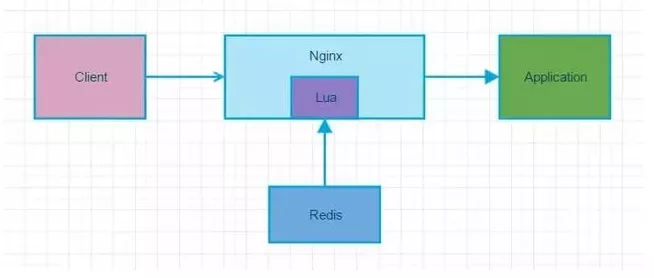
  4. 我们选择通过 Nginx+Lua+Redis 的架构实现 IP 黑名单的功能

    为了方便管理和共享架构图如下

话不多说,启动一个Redis

启动命令

1
2
#参数命令我就不解释了,你懂的  别忘记了连接的时候输入密码就行了
docker run -p 6379:6379 --name redis -v /opt/redis/redis.conf:/etc/redis/redis.conf -v /opt/redis/data:/data -d sky0429/sky0429/redis:final redis-server /etc/redis/redis.conf --appendonly yes --requirepass 123456

实现

推荐使用openresty这是一个集成了各种 Lua 模块的 Nginx 服务器

我这里使用的docker(万物皆可dockers哈哈哈)

安装 docker openresty

1
2
3
4
5
6
7
8
9
10
# 启动项目 我这个镜像好像push到我的仓库的时候提交了一些文件,应该有些基础文件
docker run -d --name openresty -p 9000:80 -v /opt/openresty/conf.d:/etc/nginx/conf.d:Z -v /opt/openresty/scriptdata:/usr/local/openresty/scriptdata sky0429/openresty:1.0

-d 后台运行
-p 9000:80 映射docker 容器与宿主机端口
-v /opt/openresty/conf.d:/etc/nginx/conf.d:Z 映射宿主机目录 /opt/openresty/conf.d 到 docker 容器的目录 /etc/nginx/conf.d
-v /opt/openresty/scriptdata:/usr/local/openresty/scriptdata 映射宿主机目录 /opt/openresty/scriptdata 到容器目录 /usr/local/openresty/scriptdata
# 你能添加z或Z选项来修改挂载到容器中的主机文件或目录的selinux label:
- z选项指明 bind mount 的内容在多个容器间是共享的
- Z选项指明 bind mount 的内容是私有不共享的

封禁方法

在这个目录 /opt/openresty/conf.d 下编写nginx.conf

1
2
3
4
5
6
7
8
9
10
11
12
13
14
15
16
17
18
19
20
21
22
23
#告诉openresty库地址
lua_package_path "/usr/local/openresty/lualib/?.lua;;";
lua_package_cpath "/usr/local/openresty/lualib/?.so;;";

# 日志打印位置
error_log /usr/local/openresty/nginx/logs/openresty.debug.log debug;

# 由 Nginx 进程分配一块 5M 大小的共享内存空间 用来缓存 IP 黑名单
lua_shared_dict forbidden_list 5m;

# 设置编码格式
charset utf8;

server {
listen 80 default;
server_name localhost;

location /lua {
default_type 'text/html';
access_by_lua_file "/usr/local/openresty/scriptdata/speedCheckOut.lua";
content_by_lua 'ngx.say("<h3>hello world 你可真是牛啊牛啊</h3>")';
}
}

然后开始编写我们的 lua 脚本,看到上面SpeedCheckOut.lua了吗,我们就在这里完成我们的访问检测

1
2
3
4
5
6
7
8
9
10
11
12
13
14
15
16
17
18
19
20
21
22
23
24
25
26
27
28
29
30
31
32
33
34
35
36
37
38
39
40
41
42
43
44
45
46
47
48
49
50
51
52
53
54
55
56
57
58
59
60
61
62
63
64
65
66
67
68
69
70
local function close_redis(red)
if not red then
return
end
--释放连接(连接池实现)
local pool_max_idle_time = 10000 --毫秒
local pool_size = 100 --连接池大小
local ok, err = red:set_keepalive(pool_max_idle_time, pool_size)

if not ok then
ngx_log(ngx_ERR, "set redis keepalive error : ", err)
end
end

-- 连接redis
local redis = require('resty.redis')
local red = redis.new()
red:set_timeout(1000)

local ip = "20.205.136.200" ---修改变量 #你服务器的ip推荐使用服务器ip而不是localhost
local port = "6379" ---修改变量
local ok, err = red:connect(ip,port)
if not ok then
return close_redis(red)
end
red:auth('123456')
--resp = redis_init:set('funet', '888888')
--resp = redis_init:get('funet')

local clientIP = ngx.req.get_headers()["X-Real-IP"]
if clientIP == nil then
clientIP = ngx.req.get_headers()["x_forwarded_for"]
end
if clientIP == nil then
clientIP = ngx.var.remote_addr
end

--ngx.say(clientIP)

--if clientIP == "101.231.137.70" then
-- ngx.exit(ngx.HTTP_FORBIDDEN)
-- return close_redis(red)
-- end

local incrKey = "user:"..clientIP..":freq"
local blockKey = "user:"..clientIP..":block"

local is_block,err = red:get(blockKey) -- check if ip is blocked
--ngx.say(tonumber(is_block))
if tonumber(is_block) == 1 then
--ngx.say(3)
ngx.exit(403)
--ngx.exit(ngx.HTTP_FORBIDDEN)
close_redis(red)
end

inc = red:incr(incrKey)

ngx.say("你可真是牛啊牛啊,当前访问次数(每秒/次数)Sec/"..inc)

if inc < 2 then
inc = red:expire(incrKey,1)
end

if inc > 2 then --每秒2次以上访问即视为非法,会阻止1分钟的访问
red:set(blockKey,1) --设置block 为 True 为1
red:expire(blockKey,60)
end

close_redis(red)

然后访问这个路径就会显示当前访问的速度,如果访问过快就会进行封禁

哈哈哈,被干掉了

总结